

 bhargava

You spent months preparing for the AP EAPCET exam, checked your answer keys, and finally hold your rank card in hand. First of all – take a breath and give yourself credit. Getting your rank is a huge milestone.
But here is the harsh reality that catches thousands of students off guard every year: your rank only gets your foot in the door. How you fill and arrange your web options determines which college classroom you actually sit in.
Every single counselling cycle, students with incredible ranks end up with mediocre colleges or zero allotments simply because they made avoidable mistakes during the choice-filling window. Conversely, smart students with average ranks often secure excellent seats by building a data-driven, strategic options list.
If you are wondering exactly how to select web options for AP EAPCET without the stress, spreadsheets, and second-guessing, this practical guide walks you through the exact algorithm strategy, common traps to avoid, and how to use the free smart AP EAPCET Web Options Generator to build your ultimate preference list.
Why Your Preference Order Matters More Than Your Rank
Before clicking a single option on the official APSCHE portal, you need to understand how the seat allotment algorithm actually thinks.
The computer evaluates your submitted web options strictly from top to bottom (Option #1 downwards). When it reaches your turn based on your merit rank and category:
It looks at your Option #1. If a seat is vacant in your category/region, it assigns it to you immediately and stops searching.
If Option #1 is full, it moves to Option #2, then Option #3, and continues walking down your list until it finds an available seat.
What Does This Mean for You?
Never put a “safe” college as your #1 choice. If your rank easily qualifies for a mid-tier college and you put it at the top of your list just to “play it safe,” the system will award you that seat immediately – even if you could have gotten into a top university listed at Option #5!
Always arrange by true preference, not predicted probability. Your Option #1 should always be your dream college and branch, followed by your realistic targets, and finally your safety nets.
The 4 Biggest Mistakes Students Make During Web Options Entry
1. Entering Only 10 to 15 Options
This is the number one reason students receive a “No Seat Allotted” status in Phase 1. If cutoffs shift slightly or applicant volume jumps, a short list leaves you completely stranded. Rule of thumb: Enter at least 50 to 80+ well-thought-out options. There is no penalty or fee for listing more choices.
2. Misunderstanding Local Regions (AU vs. SVU) and Reservations
Andhra Pradesh engineering admissions rely heavily on local area quotas (Andhra University region vs. Sri Venkateswara University region) along with specific caste, gender, and special category rules. Before planning your list, make sure you understand your exact eligibility criteria by reviewing a comprehensive reservation and quota guide.
3. Blindly Following Last Year’s Cutoffs
Historical cutoffs are a benchmark, not a guarantee. If a Computer Science (CSE) branch closed at rank 12,000 last year, assuming it will close at the exact same number this year is risky. You need a buffer zone.
4. Scrambling on the Final Portal Day
The official APSCHE counselling server gets slammed on the final day of choice locking. Session timeouts and OTP delays happen frequently. Never build your list directly on the live government portal on deadline day.
How to Select Web Options for AP EAPCET: A Step-by-Step Strategy
Instead of scribbling hundreds of college codes on blank paper, follow this structured 4-step workflow:
Step 1: Do Your Research on Official Cutoff Trends
Before deciding where you want to go, look at official opening and closing ranks from previous counselling rounds. Reviewing authentic college-wise cutoff allotments helps you see exactly what rank secured what seat across different categories.
Step 2: Run a Broad College Prediction
If you want an immediate snapshot of what is realistically within arm’s reach, run your profile through an interactive AP EAPCET College Predictor. This gives you a baseline understanding of whether you should be targeting top-tier, mid-tier, or emerging institutions for specific branches like CSE, ECE, or Artificial Intelligence.
Step 3: Build Your Strategy Using the “3-Bucket Rule”
When constructing your final web options list, divide your college-branch choices into three clear buckets:
| Bucket | Percentage of List | Strategy & Purpose |
| 1. Dream Options | Top 20% | Reach colleges where last year’s closing rank is slightly better than your rank. If cutoffs drop even slightly, you catch an amazing upgrade. |
| 2. Realistic Matches | Middle 50% | Core targets where your rank sits comfortably inside historical cutoff ranges. This is where your allotment is most likely to land. |
| 3. Safety Nets | Bottom 30% | Reliable fallback options where cutoffs are well below your rank, ensuring you never walk away from Phase 1 without a secured B.Tech seat. |
The Smarter Way: Using the AP EAPCET Web Options Generator Tool
Manually organizing 60+ colleges across multiple districts while cross-referencing branch codes (like AID, CSM, ECE, INF) can easily lead to clerical errors.
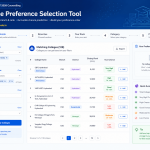
To solve this exact headache, students use the dedicated AP EAPCET Web Options Generator. Designed specifically for Andhra Pradesh counselling, this free tool acts as a preference list builder powered by official allotment data.
Why This Tool is a Game-Changer for Counselling Preparation:
Smart Multi-Filtering: You can filter colleges instantly by your Rank, Reservation Category & Gender (e.g., BC-D – Girls or OC – Boys), preferred Districts (e.g., Visakhapatnam, Guntur, Krishna), and specific Branches.
Instant Admission Chance Scoring: Instead of making you guess, the generator labels every matching college-branch combination with a clear probability rating based on real historical data:
🟢 Definitely / Very High / High / Good: Your rank comfortably beats the previous closing rank.
🟡 Probable / Possible: Your rank is within a ~10% margin of the cutoff. Ideal mid-level choices.
🔴 Very Low / Unlikely: Reach options that require a major shift in cutoffs.
Drag-and-Drop Preference Builder: You can click to add options to your custom list, drag rows up and down to reorder your priorities, or use simple move buttons until your sequence is structured exactly how you want it.
Printable PDF Export: Once your list of 50+ options is arranged, you can download or print the organized sequence. When the official APSCHE portal opens, you simply sit down with your printout and enter your college codes error-free in a matter of minutes.
Final Checklist Before Locking Your Official Options
Once you have generated and printed your tailored preference list, double-check these four points before freezing your choices on the APSCHE web counselling portal:
[ ] Are branch codes verified? Ensure you don’t accidentally select CIV (Civil Engineering) when you meant CS (Cyber Security) or CSE (Computer Science).
[ ] Is order strictly based on preference? Look at Option #15. Ask yourself: “If I am allotted #15, would I genuinely prefer it over #16?” If the answer is no, swap them immediately.
[ ] Did you include enough backup choices? Ensure your list doesn’t end abruptly at option 15 or 20. Push your list to 50+ options so the algorithm has plenty of room to work.
[ ] Did you save a final PDF copy? Always download the official submitted acknowledgment receipt from the government portal once your choices are frozen.
Take Control of Your College Admission
Your rank is fixed, but your counselling strategy is completely in your hands. Take your time, rely on verified data rather than rumors, and use modern tools to organize your choices systematically.
To explore all essential counselling timelines, document checklists, and admission resources in one place, visit the complete AP EAPCET Admission Hub. Head over to the Web Options Generator today, build your custom preference list, and step into counselling with complete confidence!




Comments
Loading…